 |
DJ Wizard 2010
Why Upgrade from 2008?
Over the years while using DJ Wizard you always knew that the information is there, but you had to look for it in all different places. How about having DJ Wizard hand it all over to you from all different sources on a small yet easy to read panel with highlights and charts? It includes info previously available on different Reports, Forms, Tables, Charts, etc. Until now, you had to open a certain module, go to a certain menu, select a form, choose a client, click on the History button, review the entire list to look over and find out outstanding info. Then you had to open another module or form to get another piece of information and so on and on until you collected and digested the full picture about the client. With 2010 upgrade, no more! Now this info is presented to you with a single click or no clicks at all (once you type the client initials or number) on a single panel with colorful and meaningful lists and charts. Furthermore, important info, like the attention info, can be updated with a single click on the spot. Now imagine having that power not for one client but all of them with a single click!
When you upgrade to DJ Wizard 2010, you enjoy a whole new level of power at your fingertips!
Client Info Panel - Feature List
With DJ Wizard 2010, you choose a client or call one and the client's full information is displayed in front of you. As you speak to the client knowing every details possible especially warnings of recent or outstanding issues with them.
 Your Options and Benefit
- Automate the Customer Info Panel: Showing you ALL the important info you must know on each client you talk to on a small but the most effective panel or information. (I bet you you'll love it).
- Click one button to sell or return or mix sell and returns of Memos with the newest Memo Transactions utility.
- Email, Fax, Preview or Print your clients Statement with a click of a single button. (Otherwise, just fax or print it w/ all the certs the old way and send it to your clients.)
- Find out what clients owe you money, what they have on Memo now or how they paid the last, say, 10 payments. Highlighting late payments for you.
- Automate the entire Memo Returns with a click of a button. Or better yet, sell the entire on-memo items the same way. In all other cases, check the items you want to sell or memo, and have all the rest returned (or sold) with a single click.
- Now you can create a whole new Memo and/or Invoice at a fraction of the time than before. Sell and Item with one click and an invoice is created and is ready to email, fax, preview or print with its certificates.
- Match Pair diamonds are indicated as 'MP' and if the diamond is not separable, it will be highlighted in red color. You can simply click that link and it will switch to the pair of diamond, and back and forth.
- Auto dialing made easy and cheap by just clicking a phone number on DJ Wizard - I love that one the best. (... and as a bonus how about calling for a very cheap rate, much less than what you probably pay now, yes as low as $3, or even less than $2 per month or even free!. Save hundreds per month right there and right now.)
- Fast entry and Memo creation with minimal clicks of a button. Fully automate the creation of a functional Invoice. Now do it in at least 10-20 times fatser. And then with a single click, you can print, fax, preview or email the Memo or Invoice with its certificates and jewelry images.
- Auto dialing made easy and cheap by just clicking a phone number on DJ Wizard - I love that one the best. (... and as a bonus how about calling for a very cheap rate, much less than what you probably pay now, yes as low as $3, or even less than $2 per month or even free!. Save hundreds per month right there and right now.)
- Automate Diamonds/Jewelry Pricing Markups/Markdowns on your entire inventory. Lower your entire inventory prices to increase sales or follow the changing Gold prices as they fluctuate.
- There is a new and sophisticated Client Form. Allowing you to add a new client and set reference to where you got their name. (like, JCK 2012, RapNet Trade, etc.) And set all fields form drop down lists.
- There is a new Client Connections Form. It allows you to list Phones, Faxes, Emails, Websites and anything else. You can enter unlimited number of each w/ a description of what it is. Like: Main Email, Private email, Joe's Direct Line, etc.
- Search for a client even if you know only the first name (not company name)! Yes, type "Joe" and see all the Joe's you have. As you keep typing, it filters in fewer options to chose from.
- ...and there is even more.
|
Stock Info Panel - Feature List
With DJ Wizard 2010, you choose a Stock ID quickly and easily and the item’s full information is displayed in front of you. When you speak to a client about the selected item, you can see that item image, certificate and stone shape. You know every detail possible especially important or outstanding ones you want to tell or have disclose to your client. Here is a partial list of some useful features.
 Your Options and Benefit
- The pricing information is sensitive to the current client’s type.
- If you wish to quickly hide a stone from uploads to trade services, like RapNet , Polygon or IDEX, just click the link and set the number of days to hide it. (Once that period is over, the stone will be uploaded back to all the trade services if it was not sold.
- If a selected item appears to have a low/high profit rate (also shown clearly on a chart), you can increase/decrease the price on the spot.
- Triple-X (Double-X or One-X) diamond stones are clearly displayed for you so you can brag about them and not miss that crucial info. The actual Polish, Symmetry, and Cut Grade are shown for you as well.
- With the new Item History, you can now tell when and for how much you offered the same item in the past and to who it was offered. If it is the selected client, his transactions will be clearly highlighted for you.
- Click the Lab link next to the diamond shape on the Stock Info Panel and view a diamond certificate and zoom into your area of interest.
- Click the Diamond Image at the top of the Stock Info Panel and view a full magnified image of the actual diamond.
- Click the Jewelry Image at the top of the Stock Info Panel and view a full magnified image of the actual jewel.
- There new Diamond and Jewelry complete History. See all the history and double click it to see the related Memo/Invoice.
- … and there is even more.
|
Firm Panel - Feature List
With DJ Wizard 2010, you click the Firm tab and instantly show your entire company performance. You get totals of how much clients owe you, how much is out on Memo now and a a full breakdown of your current inventory. Here is a partial list of some useful features based on this tab.
 Your Options and Benefit
- At any moment and anywhere in the program view your entire company balances a glance with one click. You also get to see how much is now out On Memo and by which clients. Aslo, you have sub-tab showing how much is outstanding and who are these clients organized from the biggest amount down.
- Get a snapshot of your entire inventory of jewelry, diamonds or gem stones.
- Double-click any item on the list to drill down and see how much is currently on each diamond shape or each jewelry type.
- Double click a client and see the invoices list of that client.
- You can see your inventory age broken by these categories and find out if any shape/type is too slow to sell.
- Find out who owes you money in a descending order from the largest balance to the smallest.
- Double click the Memos out total and see a clients list of Memos currently out in a descending order.
- If a client invoice is past due, it is highlighted in red.
- You can double click again to open any invoice and discuss the details with your client.
- If the client needs a copy of the Invoice or a Memo with all the details, just preview, print, fax or email it on the spot.
.
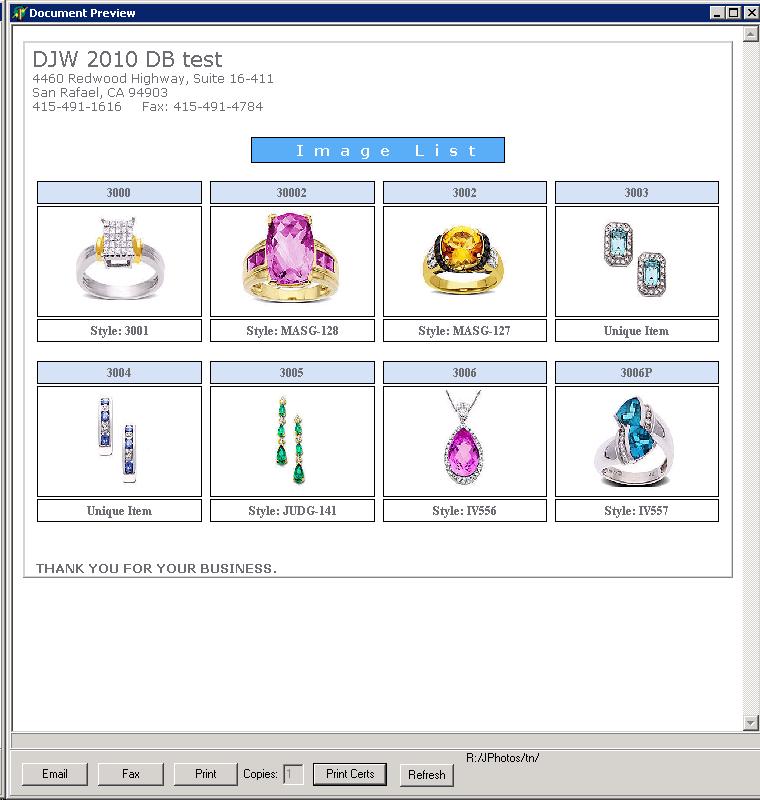
- Any listing you can see can be viewed as an image list (3,4,5,6 across) You can then email, fax or print it with the images. See "Items Promotions" example below.
- There is a new Warning tab that will show on startup if anything in your system needs your attention.
|
Items Promotions:
As a new powerful option, you can show, print, fax or email a catalog of jewlry (or stone) images and click an image to enlarge it. see this example:
Great news! As a DJW Support Agreement subscriber, we have already made arrangements to make your transition to the newest version extremely fast and simple. Your database has been
already upgraded and tested so you are good to go smoothly and right away.
Also, you are no longer being charged the same basic price for every additional
user. We have upgrade prices for 5, 10 or an unlimited number of users.
|


